Complete Step by Step New Voter Registration Guide
Vote dene ke liye sabse pehla step voter registration hota hai. Agar aap pehli baar voter list me naam add karwana chahte hain, to official voter portal par Form 6 ke through online application submit kar sakte hain.
Is New Voter Registration Guide me hum official voter portal par dikhne wale actual application process ko step-by-step samjhenge. Screenshots aur form structure ke hisaab se har section explain kiya gaya hai taaki beginners bhi aasani se application complete kar saken.
Kaun New Voter Registration Ke Liye Apply Kar Sakta Hai
Generally:
- 18 saal ya usse zyada age ke eligible Indian citizens
- Jo pehli baar voter list me naam add karwana chahte hain
- Jinka naam abhi kisi voter list me registered nahi hai
Official eligibility conditions latest voter portal par verify karni chahiye.
Documents Required
Application submit karne se pehle kuch basic documents ready rakhna helpful hota hai.
Age Proof Documents
Portal aur Form 6 ke hisaab se accepted age proof documents me generally
- Birth Certificate
- School Certificate
- Government-issued age proof documents
Shamil ho sakte hain.
Latest accepted list official portal par verify karni chahiye.
Address Proof Documents
Address verification ke liye generally.
- Aadhaar Card
- Utility Bills
- Bank Documents
- Government Address Documents
Jaise records use kiye ja sakte hain.
Latest list official portal par check karna recommended hai.
Aadhaar Requirements
Portal me Aadhaar number provide karne ka option available hota hai.
Agar applicant ke paas Aadhaar available nahi hai to portal me alternate declaration option bhi dikh sakta hai.
Online Application Process
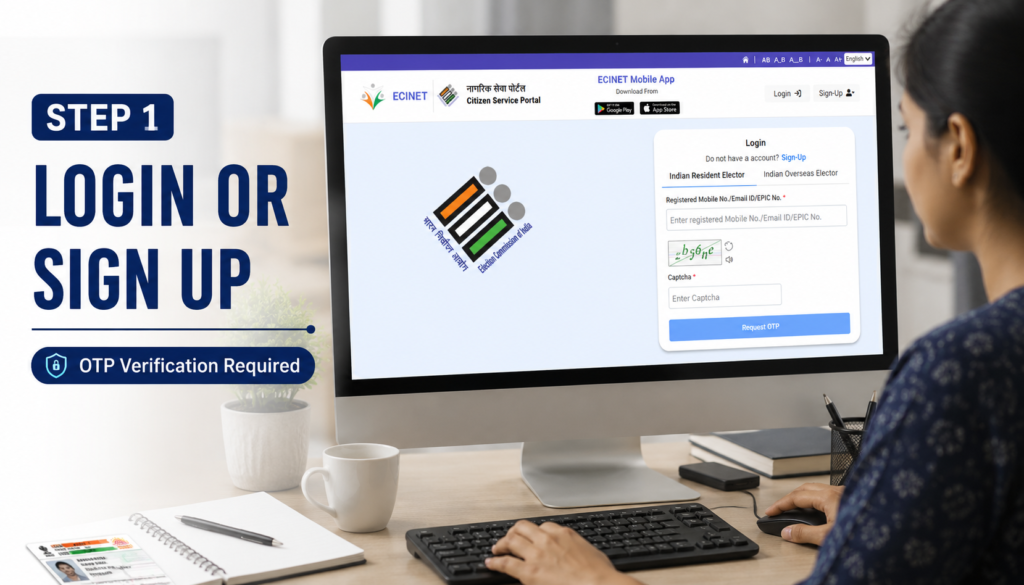
Step 1: Open Voter Service Portal
Sabse pehle official voter service portal open kare.
Portal open hone ke baad voter services dashboard dikhai dega jahan registration aur voter-related options available hote hain.
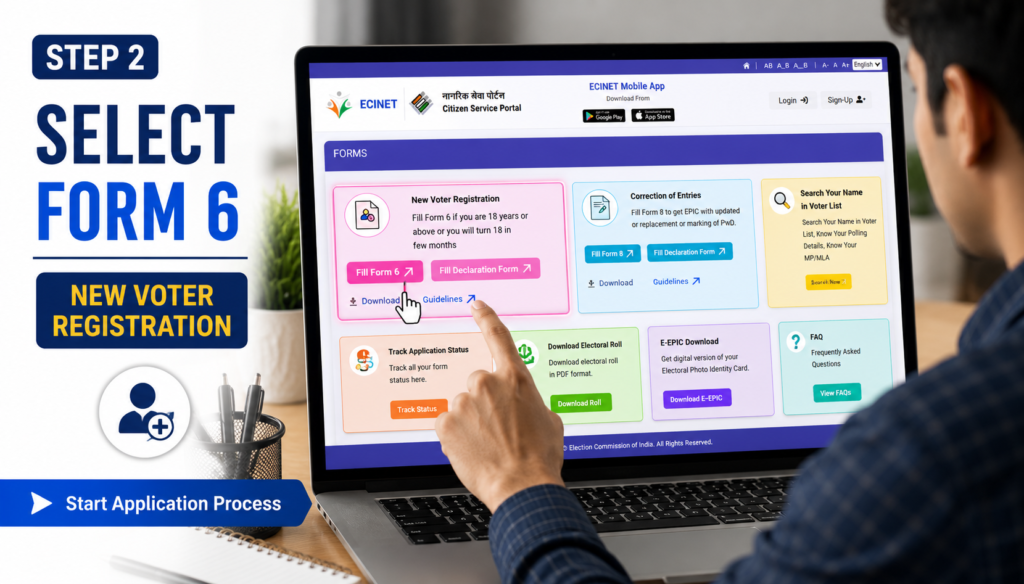
Step 2: Select New Voter Registration
Dashboard par New Voter Registration option select kare.
Yahan Form 6 option dikhai deta hai.
Form 6 un applicants ke liye hota hai jo pehli baar voter list me naam add karwana chahte hain.
Form 6 par click karne ke baad application process start ho jata hai.
Step 3: Fill Basic Details
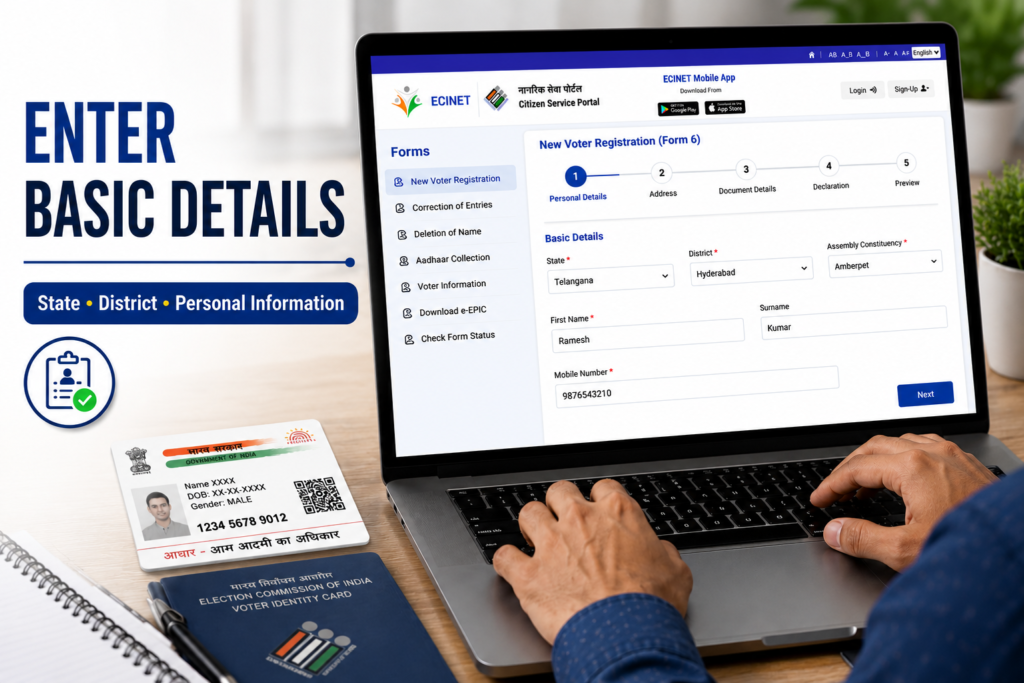
Yahan applicant ko basic information fill karni hoti hai.
Generally fields me:
- State
- District
- Assembly Constituency
- First Name
- Surname
- Personal Information
include hoti hai.
Information exactly documents ke hisaab se fill karni chahiye.
Step 4: Enter Family Details
Application form me family details section bhi available hota hai.
Is section me applicant ko:
- Relative Name
- Relationship Type
Jaise details provide karni hoti hain.
Details official records ke hisaab se fill karna better hota hai.
Step 5: Add Mobile Number and Email
Agla section contact information ka hota hai.
Yahan:
- Mobile Number
- Email ID
Enter ki ja sakti hai.
Correct mobile number dena important hota hai kyunki future communication aur verification isi par aa sakta hai.
Step 6: Aadhaar Details
Aadhaar details section me applicant ko Aadhaar information provide karne ka option milta hai.
Yahan generally do situations ho sakti hain.
Aadhaar Number Available
Applicant Aadhaar number provide kar sakta hai.
Aadhaar Number Not Available
Portal me declaration ya alternative option bhi dikh sakta hai.
Aadhaar information fill karte waqt details carefully verify karni chahiye.
Step 7: Gender and Date of Birth Details
Is section me applicant ko gender aur date of birth details enter karni hoti hain.
Gender options me generally:
- Male
- Female
- Third Gender
available hote hain.
Date of Birth ke liye supporting document upload karna pad sakta hai.
Form 6 me mentioned age proof documents me generally.
- Birth Certificate
- Aadhaar Card
- PAN Card
- Driving Licence
- Class 10 ya Class 12 Certificate
- Indian Passport
Shamil ho sakte hain.
Document upload karne se pehle ensure kare ki details clearly visible hon.
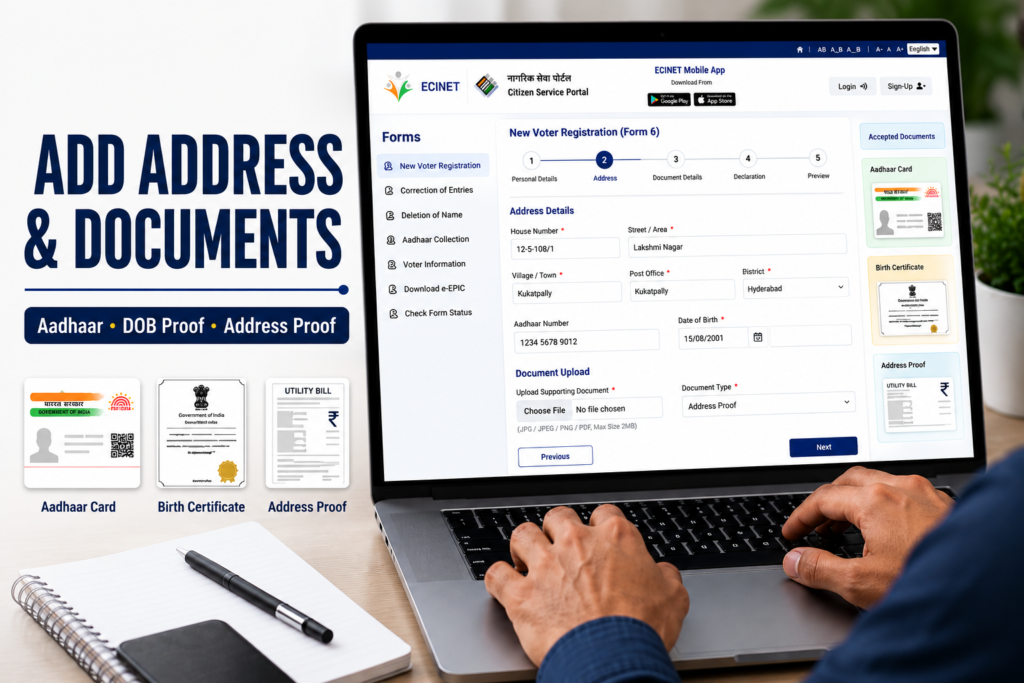
Step 8: Present Address Details
Ab applicant ko apna current residential address fill karna hota hai.
Generally, fields me:
- House Number
- Street / Area
- Village / Town
- Post Office
- PIN Code
- District
- State
Jaise details hoti hain.
Address proof ke liye Form 6 me generally ye documents mention kiye gaye hain.
- Aadhaar Card
- Electricity Bill
- Water Bill
- Gas Connection Bill
- Bank Passbook
- Indian Passport
- Registered Rent Agreement
- Registered Sale Deed
Jaise documents.
Address wahi fill kare jo supporting document me available ho.
Step 9: Disability Category Section
Ye section optional hota hai.
Agar applicant disability category mention karna chahta hai to yahan relevant information provide kar sakta hai.
Form me generally:
- Locomotive
- Visual
- Deaf & Dumb
Jaise categories available ho sakti hain.
Agar applicable na ho to section skip kiya ja sakta hai.
Step 10: Family Member Already Registered Section
Is section me applicant apne family member ki details provide kar sakta hai jo same address par pehle se voter list me registered ho.
Generally:
- Family Member Name
- Relationship
- EPIC Number
fill karna hota hai.
EPIC number voter identification ke liye use kiya jata hai.
Step 11: Declaration Section
Application submit karne se pehle declaration section dikhai deta hai.
Is section me applicant confirm karta hai ki:
- Di gayi information sahi hai
- Applicant Indian citizen hai
- Details applicant ki knowledge ke hisaab se correct hain
Declaration ko carefully read karna chahiye.
Step 12: Aadhaar Verification and OTP Verification
Declaration complete karne ke baad portal Aadhaar verification aur mobile verification process dikha sakta hai.
Generally workflow:
- Aadhaar validation
- Mobile OTP verification
- Identity confirmation
OTP receive hone ke baad code enter karke verification complete karna hota hai.
Verification successful hone par application next stage me move kar sakti hai.
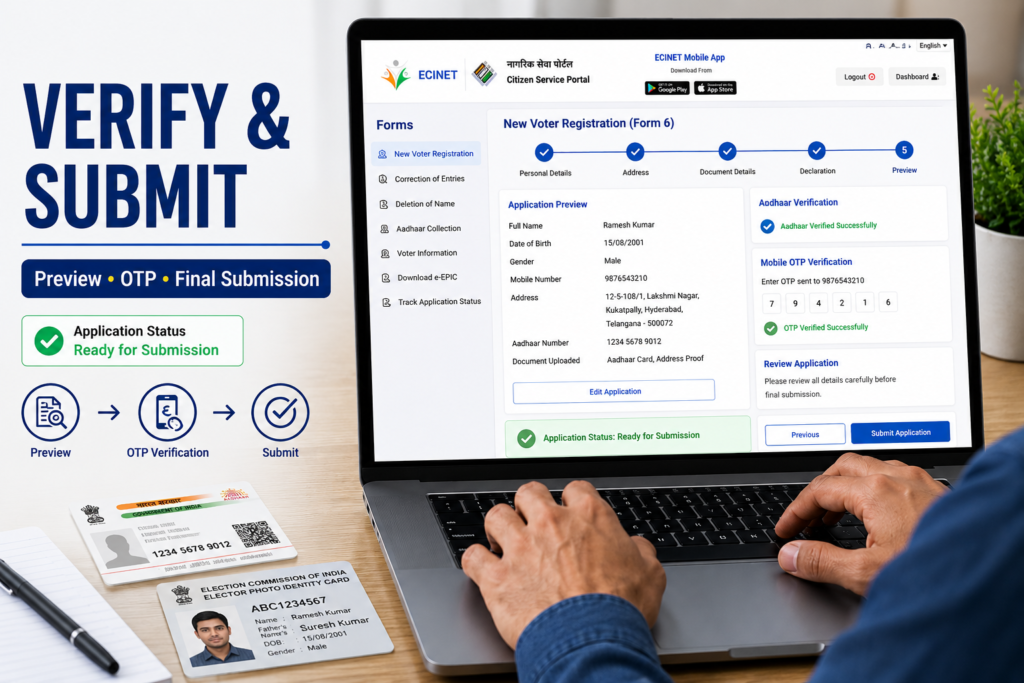
Step 13: Preview and Submit
Final step me application preview screen open hoti hai.
Yahan applicant ko:
- Personal Details
- Address Details
- Documents
- Aadhaar Information
Carefully review karni chahiye.
Koi mistake dikhe to submit karne se pehle correct kare.
Sab details verify karne ke baad Submit button par click kare.
Successful submission ke baad acknowledgement number generate ho sakta hai jise future reference ke liye save rakhna chahiye.
Offline Application Option
Jo applicants online apply nahi karna chahte, wo Form 6 ke through offline application bhi submit kar sakte hain.
Form 6 me generally:
- Name
- Address
- Aadhaar Details
- Date of Birth
- Family Information
- Declaration
fill karna hota hai.
Filled Form 6 ko concerned election authorities ke paas submit kiya ja sakta hai.
Related guides
Official Resources
Important Tips
Application submit karne se pehle:
- Name spelling verify kare
- Date of Birth cross-check kare
- Address proof match kare
- Aadhaar details carefully enter kare
- Mobile number active rakhe
- Documents clearly upload kare
Common Mistakes to Avoid
- Wrong spelling enter karna
- Incorrect date of birth fill karna
- Address proof aur address mismatch hona
- Mobile number galat enter karna
- Documents blur upload karna
- Final preview check kiye bina submit karna
Conclusion
New Voter Registration Guide ke through applicants Form 6 ka use karke online voter registration process complete kar sakte hain. Application submit karne se pehle details verify karna aur supporting documents ready rakhna process ko smooth banata hai. Latest requirements aur updates ke liye hamesha official voter service portals ko check karna chahiye.
FAQs
Q1. Form 6 kis liye use hota hai?
Form 6 pehli baar voter registration ke liye use kiya jata hai.
Q2. Kya Aadhaar number mandatory hai?
Portal par available options aur latest official guidelines ke hisaab se details verify karni chahiye.
Q3. Application submit karne ke baad kya milta hai?
Generally acknowledgement ya reference number generate ho sakta hai.
Q4. Kya online aur offline dono options available hain?
Haan, voter registration ke liye online aur offline dono methods available ho sakte hain.
Q5. EPIC number kya hota hai?
EPIC voter identification ke liye use kiya jane wala unique voter ID number hota hai.